Bhoomi RTC
The Bhoomi RTC (ಭೂಮಿ ಆರ್ ಟಿ ಸಿ) is the official online land record system of the Government of Karnataka.The name Bhoomi literally means ‘land’ in Sanskrit. It’s a massive project designed to digitize all the manual, paper-based land records in the state and make them easily accessible to the public, particularly farmers and landowners.
The Bhoomi portal was launched by the Government of Karnataka in the year 2000. It was a pioneering effort to computerize and manage land records, developed and implemented by the National Informatics Centre (NIC).
The primary document it handles is the RTC, which stands for Record of Rights, Tenancy, and Crops, also locally known as Pahani (ಪಹಣಿ). The RTC is essentially the “report card” of a piece of land, containing crucial information.
Bhoomi Online Services
| Feature | Service Details & Information |
|---|---|
| Portal Name | Bhoomi Online RTC Karnataka Land Records Portal. |
| State | Karnataka, India. |
| Department | Managed by the Revenue Department of Karnataka. |
| Objective | To provide computerized, transparent access to land records like Pahani and Mutation. |
| Records Available | Digitization of millions of land records across the state. |
| Key Document | RTC (Pahani), including details on ownership, crops, and land type. |
| Mutation Services | Allows citizens to track title change status and view mutation extracts. |
| Additional Services |
|
| Official URL | landrecords.karnataka.gov.in |
Land Record Services Offered by the Bhoomi Online Portal
The Bhoomi (ಭೂಮಿ) Portal acts as the digital front door for all your land records in Karnataka, offering services that make accessing, updating, and verifying your property details much easier. Think of it as your online property file cabinet!
1. Core Record Access (The Pahani/RTC)
The most popular services revolve around the primary land document, the Record of Rights, Tenancy, and Crops (RTC), also known as Pahani (ಪಹಣಿ):
- View RTC (Pahani) and MR: This allows you to look up the main document showing who owns the land (RTC) and the official register of title changes (Mutation Register). You can check records for both the current year and old years.
- i-RTC/Pahani Online: This is the service you use to get a digitally signed, original copy of your land record, which is legally valid for purposes like bank loans or court matters.
- View Khata Extract: You can pull up the extract that summarizes the property’s revenue and ownership details, mainly used for tax assessment.
2. Services for Ownership Transfer (Mutation)
If land changes hands due to a sale, inheritance, or gift, the records need updating through a process called Mutation. The portal helps track this:
- Check Mutation Status: You can follow the progress of your application for changing the land title, seeing exactly which government official it is pending with.
- Mutation Extract: You can access the detailed report that officially documents the change in ownership.
- Bhoomi RTC Mutation History: This feature lets you look back and see the entire chronological history of all title changes for a specific piece of land.
3. Survey, Maps, and Boundaries
These services give you the geographical and technical details of the land:
- Revenue Maps: You can view and download the official village or area maps, which help in visually confirming the location and boundaries of a property.
- RTC Sketch (Tippan): This provides access to the precise, digitized sketch of the land parcel, showing its shape and measurements as determined by the survey department.
- Mojini Services: This is an important related platform for accessing land survey documents and technical sketches used for boundary marking and other official survey purposes.
4. Land Use and Conversion
The portal simplifies the process of changing a land’s legal classification:
- Apply Online for Land Conversion (ಭೂಮಿ ಪರಿವರ್ತನೆ): You can submit an application to convert agricultural land to non-agricultural use (like residential or commercial).
- Track Conversion Status: Once applied, you can monitor the status of your land conversion request online.
- Download Final Conversion Orders: The approved order from the government, which is the final legal document for the land’s new use, can be downloaded directly.
5. Verification and Financial Services
These tools ensure the security and smooth functioning of the digital records:
- I-Wallet Services: A digital payment system used to pay the required fees for accessing certified documents like the i-RTC.
- RTC XML Verification: A verification tool that checks the authenticity of a downloaded digital RTC document to make sure it is original and hasn’t been altered.
- Citizen Registration: A general service allowing citizens to register on the portal to access secure services and receive updates.
Benefits of the Bhoomi (ಭೂಮಿ) Portal
The digitization of land records through Bhoomi offers significant benefits to the people of Karnataka:
- Ease of Access: Land records like RTC/Pahani can be accessed and downloaded online or at government kiosks without visiting a Taluk office multiple times.
- Transparency and Security: Digitization reduces the risk of document tampering and fraud, as the central record is securely maintained and publicly verifiable.
- Reduced Corruption: Minimizes the need for direct interaction with revenue officials, thereby curbing corruption.
- Quicker Loan Processing: Banks readily accept the digitally signed RTC as proof of ownership and land use, speeding up the process of securing agricultural and other loans.
- Simplified Land Transactions: Provides accurate, verified records for buyers and sellers, making property transactions smoother and less prone to disputes.
Steps to Check RTC (Pahani) on Bhoomi Online
To view your land record (Pahani/RTC), you typically look for the ‘i-RTC’ or ‘View RTC and MR’ section:
- Visit the Official Portal: Go to the official Karnataka Land Records website.

- Navigate to RTC Services: Look for and click on the ‘View RTC and MR’ or ‘i-RTC’ option (you may need to log in as a citizen or guest for the i-RTC option).

- Enter Land Details: Select the appropriate options for:
- District
- Taluk
- Hobli
- Village

- Enter Survey Details: Input the Survey Number, Surnoc Number (Sub-division), and Hissa Number (if applicable).
- Fetch Details: Click on ‘Fetch Details’ or ‘Go’ to view the RTC information on the screen.

- Download (i-RTC): If using the dedicated i-RTC service, you’ll need to pay a nominal fee to download a digitally signed copy.
Extract Mutation Report in Bhoomi Online Portal
The Mutation Report (MR) details the history of ownership changes for a land parcel.
- Visit the Official Portal: Go to the official website and navigate to the services section.
- Select Extract: Look for and click the ‘Mutation Extract’ option.
- Enter Land Details: Select the District, Taluk, Hobli, Village, and Survey Number.
- Fetch Details: Click on ‘Fetch Details’ to see the list of all mutation transactions for that Survey Number.
- View Report: Select the specific mutation from the list and click ‘Preview’ to view the report.
Steps to Check Mutation Status on Bhoomi Online
The mutation status tells you the current stage of your application for changing the land title.
- Visit the Official Portal: Go to the official website.

- Select Mutation Status: Click on the ‘Mutation Status’ option.
- Enter Details: Enter the required details, including::
- District
- Taluk
- Hobli
- Village
- Survey Number
- Fetch Status: Click ‘Fetch Details’ to view the application status, which shows which official is currently processing your request.
Steps to Check Revenue Maps on Bhoomi Online
Revenue maps provide a visual representation of the land parcels within a village.
- Visit the Official Portal: Go to the official website.
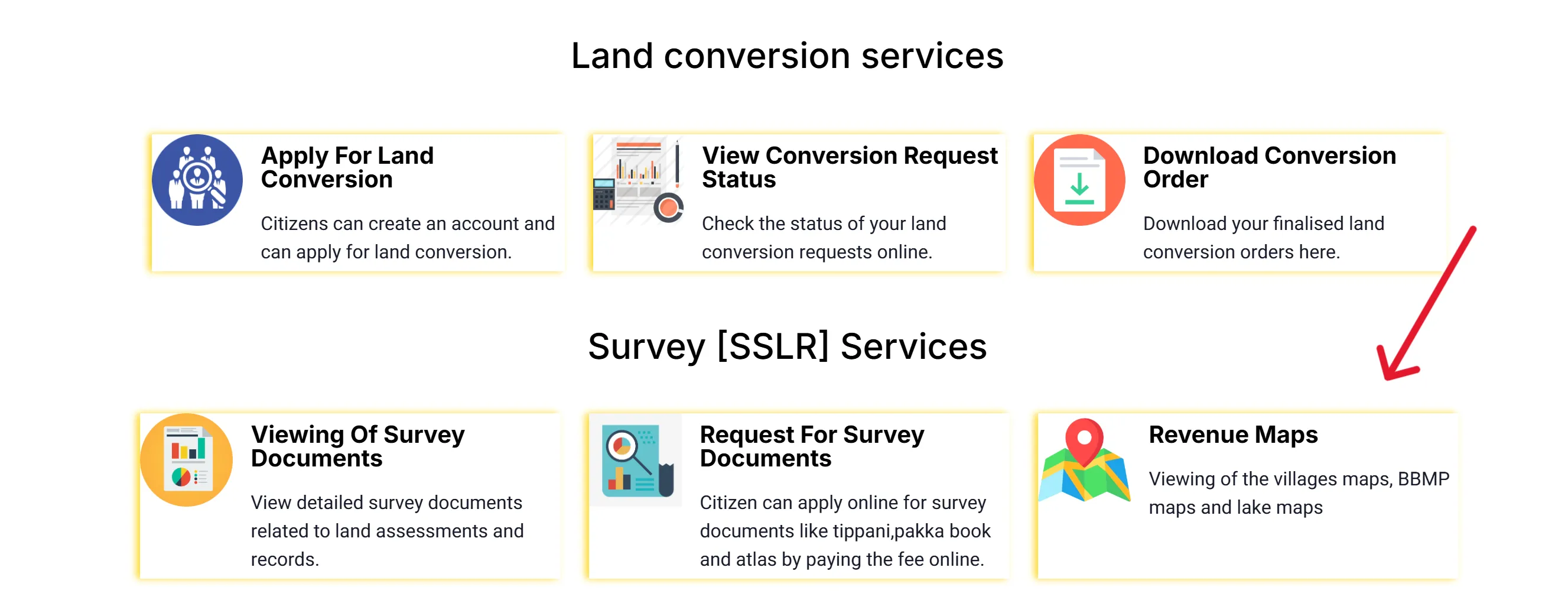
- Select Revenue Maps: Look under the Survey (SSLR) Services section and click on ‘Revenue Maps’.

- Select Location: You will be redirected to a new page where you need to select the District and Taluk.
- View Map Index: Select the appropriate options to find the village map index.
- View/Download: Click on the link to view or download the relevant map (often in PDF format).
Contact Details
| Contact Type | Details |
|---|---|
| Helpline Number | 8277864065 |
| bhoomi@karnataka.gov.in | |
| Office Address | K.R. Circle, Bangalore – 560001 |
FAQ’s
What is the full form of RTC?
The full form is Record of Rights, Tenancy, and Crops (also known as Pahani).
Can I apply for a land mutation directly online through the Bhoomi portal?
While you can check the status and extract the report online, the application for mutation is typically submitted via a Kiosk (Nada Kacheri) or the Citizen Portal, where documents are uploaded and payment is made.
Is the RTC document downloaded from the Bhoomi portal legally valid?
Yes, the i-RTC or digitally signed RTC obtained from the portal after paying the fee is a legally valid document.
What is a Survey Number?
It’s a unique number assigned by the Revenue Department to identify a specific parcel of land.
What is Khata Extract and how is it different from RTC?
The Khata Extract is a summary of the property ownership and revenue details used mainly for taxation purposes. The RTC, or Pahani, provides much more detail, including crop and tenancy information.
Do I need to pay to view the RTC on the Bhoomi portal?
Viewing the RTC details on the portal is often free, but downloading the digitally signed and certified copy (i-RTC) requires a nominal fee.